# Play funscripts using VLC and MultiFunPlayer
### What you need
- Your stroker
- [VLC Media Player](https://www.videolan.org/vlc/)
- [MultiFunPlayer](https://github.com/Yoooi0/MultiFunPlayer/releases)
- The standard release will ask you to download .NET runtime version 8
- The *Self-contained* version doesn't require any extra dependencies, and will work out of the box
### Configuration
1. **Configure VLC**
1. `Tools > Preferences` (Ctrl + P)
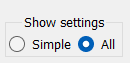
2. Show all settings (on the bottom left of the window)
[](https://osr.wiki/uploads/images/gallery/2024-01/dzbimage.png)
3. Scroll down to `Interface` and **click on** `Main interfaces`
Tick the checkbox for `Web`
[](https://osr.wiki/uploads/images/gallery/2024-01/iqximage.png)
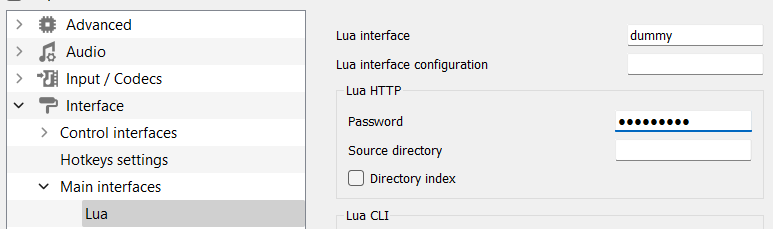
4. Click on the arrow next to `Main interfaces`, go to `Lua`, and enter a password in the *Password* field.
[](https://osr.wiki/uploads/images/gallery/2024-01/rwQimage.png)
5. Save, close VLC and reopen it
2. **Configure MultiFunPlayer**
1. Connect to VLC
- On the very top box, click the `+` icon and select *VLC* [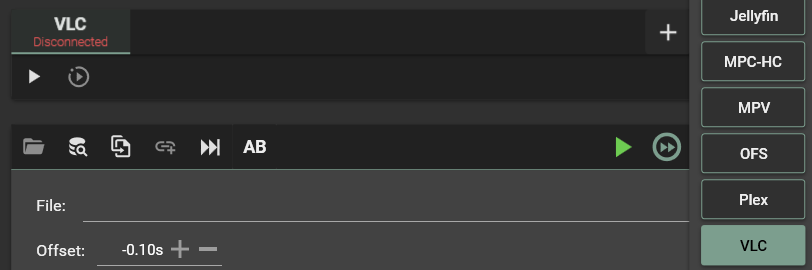](https://osr.wiki/uploads/images/gallery/2024-01/ZEOimage.png)
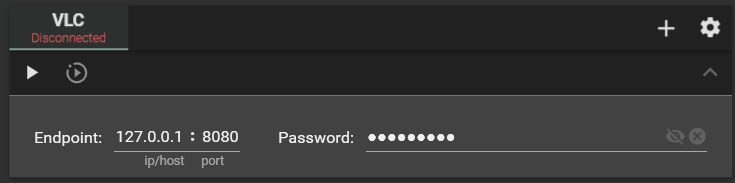
- Click the dropdown arrow on the right of the box, and enter the same password you entered in the VLC Preferences
[](https://osr.wiki/uploads/images/gallery/2024-01/hS8image.png)
- Click on the Play button under the "VLC" tab, and it should connect to VLC
2. Connect to your stroker
- Plug in the USB cable
- At the very bottom of the interface, click on the `+` button on the right, and select *Serial* [](https://osr.wiki/uploads/images/gallery/2024-01/efuimage.png)
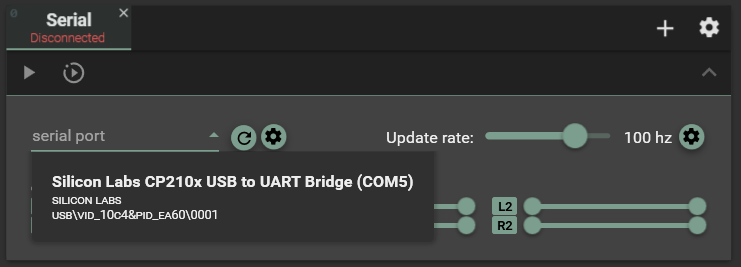
- Click the `serial port` dropdown menu, and select your microcontroller
(pictured: **ESP32**)
[](https://osr.wiki/uploads/images/gallery/2024-01/bagimage.png)
- Click the play arrow under `Serial` to connect to it
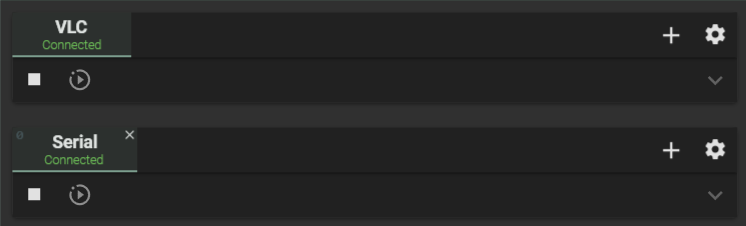
Your interface should now look something like this
[](https://osr.wiki/uploads/images/gallery/2024-01/pbkimage.png)
### Playing back a video alongside a funscript
1. Open a video with VLC
2. MultiFunPlayer will automagically pick up the funscripts and assign them to the right axes, if
- They are stored alongside the video
- They are in the same folder as the video
- They are [named correctly](https://github.com/Yoooi0/MultiFunPlayer#how-to)
In MFP version 1.28, it appears the funscripts don't load automagically alongside VLC.
To remedy this, click the *Script Repositories* button (the three stacked pancakes with a magnifying glass), and add either the folder of your video as a source, or its parent folder and make it recursive using the checkbox to its right.
[](https://osr.wiki/uploads/images/gallery/2024-01/I9nimage.png)[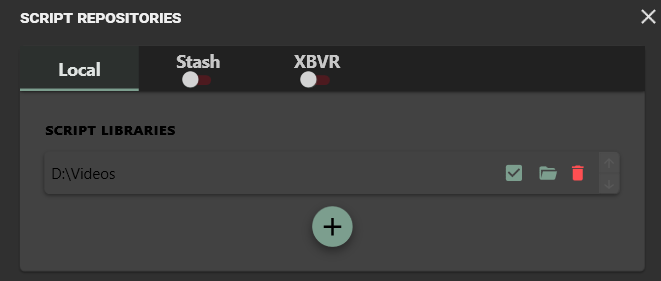](https://osr.wiki/uploads/images/gallery/2024-01/dG3image.png)
[Source](https://discord.com/channels/664171761415356426/664171761864278028/1184647188270293032)
The above issue seems to be fixed in version 1.29 Alpha
[Source](https://discord.com/channels/664171761415356426/664171761864278028/1184664584678809660)
Happy stroking!